

Gmail, developed by Google, is one of the most powerful email platforms available today. While most users rely on it only for basic emailing, Gmail actually includes dozens of advanced features and smart add-ons that can completely transform how you manage communication. When used correctly, Gmail becomes more than an inbox—it becomes a productivity engine.
One of the most underrated Gmail tools is Advanced Search and Filters. Instead of manually digging through thousands of emails, you can search by sender, subject, keywords, file size, or attachment type. Filters allow you to automate actions such as labeling, archiving, deleting, or forwarding emails the moment they arrive, keeping your inbox clean without effort.
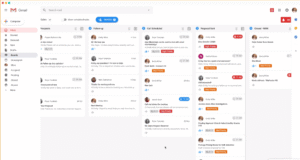
Multiple Inboxes is another powerful feature many users overlook. It allows you to divide your inbox into sections like unread messages, starred emails, or messages from specific senders. This is especially useful for professionals who manage work, personal, and promotional emails in one account but want clear separation.
The Scheduled Send feature helps you plan communication more strategically. You can write emails in advance and choose the exact date and time they should be sent. This is ideal for follow-ups, marketing emails, or communicating across different time zones without disrupting recipients.
For users who handle sensitive information, Confidential Mode adds an extra layer of security. It lets you set expiration dates, restrict forwarding or downloading, and require SMS verification. This feature is perfect for sharing private documents, contracts, or financial details.
Another highly practical feature is Gmail Offline Mode. Once enabled, it allows you to read, search, and draft emails without an internet connection. Any changes you make sync automatically once you’re back online, making it extremely useful for travel or low-connectivity situations.
Email Snoozing is designed for better time management. It temporarily removes emails from your inbox and brings them back at a time you choose. This helps you stay focused on priority tasks while ensuring important emails don’t get forgotten.
Gmail’s AI-powered tools, Smart Reply and Smart Compose, can save hours every week. Smart Reply suggests quick responses, while Smart Compose predicts and completes sentences as you type. These features are especially helpful for routine or professional communication.
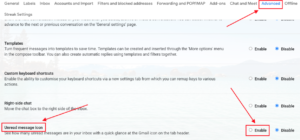
One feature that power users love is Keyboard Shortcuts. Once enabled, you can navigate Gmail, archive messages, open emails, and compose replies without touching the mouse. Over time, this significantly speeds up email handling and reduces fatigue.
Gmail also includes Email Templates (Canned Responses), which allow you to save frequently used replies. This is ideal for customer support, sales follow-ups, and business communication where consistency and speed matter.
Beyond built-in tools, Gmail becomes even more powerful with essential add-ons and extensions. These include task managers, CRM tools, email trackers, grammar checkers, and scheduling assistants. Add-ons integrate directly into Gmail, reducing the need to switch between multiple apps.
Priority Inbox is another smart feature that automatically categorizes emails based on importance. It learns from your behavior and highlights messages that truly matter, helping reduce inbox overload and decision fatigue.
Custom Labels, Colors, Stars, and Markers allow you to visually organize emails in a way that suits your workflow. This makes it easier to identify urgent tasks, follow-ups, or specific projects at a glance.
Gmail also offers tools like Auto-Reply (Vacation Responder), Undo Send, Read Receipts (Workspace users), and Conversation View Control, all designed to give you more control over communication and reduce errors.
In conclusion, Gmail is far more than a simple email service. By exploring these 21 rarely used features and essential add-ons, you can transform your inbox into a highly efficient productivity system. Small changes in how you use Gmail can lead to better focus, faster responses, and a more organized digital life.